Showing posts with label vaadin. Show all posts

Tuesday, July 17, 2012

Book of Vaadin - Vaadin 7 Draft Edition

I just sent the Book of Vaadin, Vaadin 7 Draft Edition, to print. I've been really busy with it for the last month, as there is so much to do. Some years ago, when we went from IT Mill Toolkit 4 to 5, it took over six months to rewrite it. Now the book is many times bigger and the changes in Vaadin 7 are really radical.


The edition is really a draft, and it says so right in the title and in many places inside the book. Many of the changes in Vaadin 7 require going through the book almost word by word, so I hope to get it done before the end of the year.

Also, the last batch of Vaadin 7 enhancements is yet to be released in the first beta, which should be out at the end of August.

The printed book will be available at JavaOne, and at some other locations. We try not to print this draft in huge numbers, just for the most important conferences in fall of 2012.

Big Changes in Vaadin 7

The first big thing in Vaadin 7 is the renewal of the basic application API. You no longer extend Application to write an application, but a Root (name is subject to change). Root is much what Window used to be, and the Window now means only a sub-window. There's also a separate Page object associated with a Root.


Another big topic is the client-side API, which has been essentially rewritten to use connectors that communicate between a client-side widget and the server-side component. The framework handles state object serialization transparently, and there is also an RPC mechanism. Hence, the client-side development chapter has been rewritten from scratch and it still needs a lot of work.

For most developers, also forms and data conversions are very important. There is no longer a Form component, but a FieldGroup that helps in binding fields and data together. I have written probably a hundred examples that use the old Form, so there's quite a lot work in converting them all to the new model.

And there are dozens of other significant changes.

Vaadin += GWT

Then perhaps the biggest thing in Vaadin 7 is that it now includes GWT. Just putting the GWT classes inside the Vaadin JAR sounds does not itself sound significant, the significance comes from the consequence that as we provide support for Vaadin, which now includes GWT, we also provide support for GWT. Vaadin now also effectively supports two development models: one for the server-side as before, but also for pure client-side applications.

Pure client-side Vaadin applications are of course more restricted, but they have their uses. Not all applications need data from a server, but just work on data input by the user. Also, pure client-side application can work off-line, unlike server-side Vaadin applications (unless you install the server on the client machine). For example, the Vornitologist demo for TouchKit has an off-line mode that displays a pure client-side version of the application when the network is not reachable. It uses HTML5 local storage to store the application itself, as well as the data, until the network is reached again and it can send the data back to the server. Then, the application can revert back to the full-featured server-side application. To try it out, run the demo on either an Android or iOS device.

References

Some links:
Notice again, that the Book and the book examples are really unfinished drafts at this point, and will be in better shape at the end of the year when Vaadin 7 is planned to be released.

Tuesday, March 20, 2012

New revision of Book of Vaadin is out

Work stuff. We have been getting a new revision of the Book of Vaadin out about every six months and the latest came from print today. This time we didn't increment the edition number, so it is the 1st revision of the 4th Edition. Essentially, one major reason was that we ran out of colors in the Vaadin color palette so the new revision looks just as yellow-orange as the original 4th Edition.

Regardless of the similar appearance, the revision packs almost 100 pages more content. The biggest change is the reorganization into two parts: the core framework and the addons. Some new add-on documentation is included in the core part: Vaadin Control Panel for Liferay, Vaadin IPC, and Vaadin WSRP. The SQLContainer add-on is now part of the core framework.

Of the add-on documentation, the JPAContainer chapter was entirely rewritten couple of months ago and the Calendar chapter was revised more recently.

Unfortunately, there are some outdated parts that went to print. Most notably, there is a really outdated material in the Vaadin embedding section, related to version 5.2. I hope there isn't much Toolkit 4 stuff left, just cleaned some references out at the last minute.

This all applies only to the print edition, which you can pick up for free at some conferences. The web edition is always the latest and it gets all additions on the same day I edit it.

Vaadin 7 is in the works. We hope to get a preview edition of the Vaadin 7 book out in the summer, in July or so. Perhaps it could be red, if we begin the color cycle in the same order we did with Vaadin 6. The color is always a big decision.

Saturday, January 21, 2012

JPA and Vaadin JPAContainer

I've been finalizing the completely rewritten chapter about Vaadin JPAContainer this week. I still need to check that everything really important is included.

I don't have almost any previous experience with JPA, which is kind of good thing when you write documentation about something. That way, you personally know all the questions a beginner would have.

JPA and ORM in general seem pretty important technologies. Whatever your application is, you most probably need some data storage. Using ordinary files is possible, but not near as handy as proper databases. However, stuffing complex class structures through the square holes of database tables was a hell before the ORM technologies emerged. XML databases and NoSQL were much nicer for structured storage.

Some years ago I did some experiments with related technologies, such as JAXB and Hibernate, but using them was a bit too much effort at that time. Using Hibernate with Vaadin really required a Container implementation, but there wasn't one at that time. Well, JPA is quite close to Hibernate, and Hibernate is currently one of the JPA implementations.

Vaadin JPAContainer makes things really easy.
// Create a persistent person container
JPAContainer<Person> persons =
JPAContainerFactory.make(Person.class, "book-examples");

// You can add entities to the container as well
persons.addEntity(new Person("Marie-Louise Meilleur", 117));

// Bind it to a component
Table personTable = new Table("The Persistent People", persons);
personTable.setVisibleColumns(new String[]{"id","name","age"});
layout.addComponent(personTable);
So, just one command to get a container bound to data in a database table. JPAContainer is, however, just for binding user interface components directly to data. You can use it to add or edit the data, but using pure JPA is much nicer, easier, and more flexible for that.
EntityManager em = JPAContainerFactory.
createEntityManagerForPersistenceUnit("book-examples");
em.getTransaction().begin();
em.createQuery("DELETE FROM Person p").executeUpdate();
em.persist(new Person("Jeanne Calment", 122));
em.persist(new Person("Sarah Knauss", 119));
em.persist(new Person("Lucy Hannah", 117));
em.getTransaction().commit();
Well ok, here we got the entity manager from the JPAContainerFactory, which makes that a bit easier than normally.

JPAContainer is a commercial product. That shouldn't be a problem if you're coding for a company that can pay the license. For free software, you can use the AGPL license. I've always felt that this sort of dual-licensing scheme is most difficult for "potential startups" where you experiment with a business idea, but do not yet have a company to back it up financially. You do not normally have the money to invest in licenses at that point, and a company might not want to invest much in such experiments either.

There are of course alternatives for JPAContainer. Using pure JPA is quite OK approach as well, combined with BeanItemContainer in Vaadin. There's also SQLContainer. It is also something I don't know about, as I didn't write the chapter myself. I would need to review and reorganize it in next weeks though, and possibly rewrite at some point.

Well, I did make a couple of mistakes while writing the JPAContainer chapter. The first one was trying to just update a really complex design documentation written by someone else, in a topic I knew nothing about. Writing is always a learning experience and it's not sensible to try to write about something very complex that you don't have a clue about. Sometimes, it's best to start from scratch. Unfortunately, I didn't do that when I started, but just over a week before the release.

Another issue is learning by doing. I usually start writing documentation by experimenting how it works, making some example code. This time, as I was in a hurry, I tried to skip that phase. I only started it as the last effort when I was totally stuck, some 4 weeks of struggle behind and 2 work days before the release date. Just in those couple of days, all pieces fell into place and I finally understood how everything works.

Tuesday, January 3, 2012

Vaadin IPC for Liferay add-on

For Vaadin users, I just finished writing documentation for the Vaadin IPC for Liferay add-on yesterday. The version 1.0 of the add-on will be released tomorrow I think. The add-on is very very useful if you want to have two portlets that communicate with each other on the same page. The add-on uses standard Liferay JavaScript event API, so the other portlets can be any Ajax portlets, not just Vaadin.

Here's how it works:


As a side note, I really like Inkscape for drawing those diagrams. Well, I have no clue how wonderful some "best-of-the-best" vector graphics apps are. But I seem to be able to do practically everything with Inkscape and, after a while, it's not so hard to use. I've also done a nice production pipeline so that I can just save the pictures as SVG and the build scripts for the book do the exporting to PNG automatically. It's not even hard, just one command-line call.

The LiferayIPC is a Vaadin component that you add in the main window (layout). The inter-portlet communication is done between the client-side widgets.
LiferayIPC liferayipc = new LiferayIPC();
layout.addComponent(liferayipc);
...
liferayipc.sendEvent("hello", "This is Data");
To receive an event in other portlets, you define a LiferayIPCEventListener as follows:
liferayipc.addListener("hello", new LiferayIPCEventListener() {
public void eventReceived(LiferayIPCEvent event) {
getWindow().showNotification(
"Received hello: " + event.getData());
}
});
The add-on package includes this nice demo WAR that you can just deploy in Liferay. It demonstrates how to send and receive inter-portlet events.


You can combine this client-side communication method with server-side inter-portlet communication, for example, by using portlet session attributes. You may need to do that for security reasons or if you need to send large amount of data. In such case, you just send a client-side notification that says: "Hey, there's new server-side data available, read it now."

So, go ahead and read the new section in the Book of Vaadin. It explains everything. If it doesn't...go and ask in the Vaadin forum.

Thursday, March 24, 2011

Cross-Site Embedding Vaadin Applications

I've been recently testing the embedding of Vaadin applications.
Here's the Vaadin Sampler embedded:


Well, the application isn't made for this narrow columns, but it works, and runs on a completely different server. And isn't in an iframe.

Essentially, all you need to embed an app is:
    <script src="http://demo.vaadin.com/xsembed/getEmbedJs" type="text/javascript"></script>
However, if the app has 100% vertical size, you must put it in an element with a defined height. You may also want to set the width in some cases, such as in the example above:
<div style="height: 600px; width: 400px; overflow: auto;">
<div style="height: 500px; width: 800px;">
<script src="http://demo.vaadin.com/xsembed/getEmbedJs" type="text/javascript"></script>
</div>
</div>

Wednesday, February 10, 2010

Vaadin Refcard updated

I made a few minor corrections and additions to the Vaadin Refcard, which was released last week at DZone. If you already downloaded it, you might to get the new version.
  • Vaadin is available under Apache License 2.0
  • For Item editors, such as the Form component, you can set the item data source with setItemDataSource()
  • For Container editors, such as the Table or Tree components, you can set the container data source with setContainerDataSource()
  • The book cover on the last page was updated - the cover for Vaadin 6.2 edition is blue
  • The text in the last page was reordered to be more correct
The refcard could be updated next after Vaadin 6.3 is released in the late spring. The major features are use of GWT 2.0 for the client-side, drag'n'drop, and support for portlet flat mode.

    Monday, February 1, 2010

    Vaadin Refcard is out!

    The Vaadin Refcard is finally out at DZone. Download yours now or browse the card on-line.

    If you're a newcomer to Vaadin or interested in finding out what it is, the Refcard offers a great introduction to Vaadin. Much of the reference material should be also useful to those already familiar with Vaadin.


    The six pages of the Refcard present a well thought summary of the most essential features of Vaadin, which are covered in detail in the Book of Vaadin. Much of the reference information is presented in tightly packed diagrams; just look at them for a moment and I hope you'll see the genius of Vaadin as I do.

    The contents are:
    • Creating an Application
    • Components
    • Layout Components
    • Themes
    • Data Binding
    • Creating New Components
    As Vaadin is developing fast, I hope to make updates to the card occasionally. So, especially after update releases (Vaadin 6.3 is coming next), please look out for an update of the card.

    More Information:

    Friday, January 8, 2010

    Client-Side Validation for Vaadin

    I recently created a new component for Vaadin, the CSValidationTextField (suggestions for a better name are welcome), which is an extension of the regular TextField. It can validate the input with a regular expression and/or a JavaScript program.

    Of course, you can't trust the client-side code for validation, so you need to validate the input on the server-side as well. For regular expression validation, you can use the same expression for the server-side RegexpValidator. For example:

    // The Finnish Social Security Number
    final CSValidatedTextField ssn = new CSValidatedTextField("SSN");
    String ssn_regexp = "[0-9]{6}[+-A][0-9]{3}[0-9a-zA-Z]";

    // The client-side validation
    ssn.setRegExp(ssn_regexp, "000000-000A");
    ssn.setAllowInvalid(false); // Prevent typing invalid values

    // The server-side validation
    ssn.addValidator(new RegexpValidator(ssn_regexp, "Invalid SSN"));
    ssn.setRequired(true);
    ssn.setRequiredError("SSN is required");

    form.addField("ssn", ssn);

    Matching partially filled values has some problems currently. If you disallow typing invalid input, as in the example above, the regexp validation currently needs an "example" and is restricted to only fixed-length fields. I'll have to look if the JS regexp matching can somehow report if there's a partial match. If you allow invalid input, there are no restrictions and the fixed-length example is not needed.

    You can validate with JavaScript just as easily:

    CSValidatedTextField postcode = new CSValidatedTextField("Postal Code");
    postcode.setJavaScript("if (value >= 0 && value < 10000)" +
    " \"partial\";" +
    "else if (value >= 10000 && value <= 99999)" +
    " null;" +
    "else" +
    " \"Postal Code must be a 5-digit number between 10000 and 99999\";");
    layout.addComponent(postcode);

    The server-side validation needs separate Java code though, unless you use some JavaScript execution library.

    You must validate the input on the server-side as well, as the client-side validation does not actually prevent inputting invalid values (unless you set setAllowInvalid(false), but that's a bit restricted at the moment).

    See the example source codes (link below) for more examples.

    See:

    Included are also handy interactive editors for the regular expressions and JavaScript validators, as you can see in the demos.

    The component is not packaged yet, so using it may require some effort. I'll have to look into the packaging.

    Tuesday, October 27, 2009

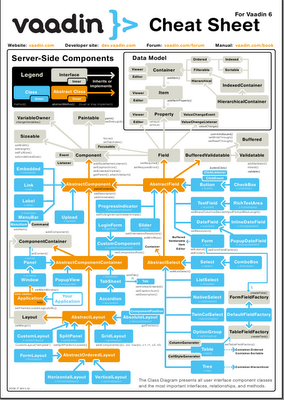
    Vaadin Cheat Sheets

    I designed the Vaadin Cheat Sheet last summer. I really like it, especially its style that follows the Vaadin graphical style.

    During the last few weeks, the demand for the cheat sheets has been growing. There's one on display at the ICT building in Turku, where you can get a free copy of Book of Vaadin. This week, I got some more lamination pockets to make more laminated cards. The new pockets with matt finish are nice, you can even write on them with a pencil.

    I somewhat enjoy laminating the cards. Even though it's purely manual labour, it's quite relaxing to work manually by a routine for a change and not have to think or design anything. This also means that I can't make the cards by the thousands, like the books. Nevertheless, I try to make enough for IT Mill customers, some community members, and for special promotion purposes.

    Just today, I corrected a small error: the CSS style class of the ComboBox component is v-filterselect, not v-combobox. There might be other similar errors.